¶ Installation Guide
Detailed installation for setting up the phone system.
¶ Overview
The best way to switch phones systems is a way that involves no down time. That's what we strive for. We can choose when we want to forward inbound calls from the old system into our new system. This gives us a couple options on how to achieve a no-downtime switch. The best way to accomplish this is to have a short period of time where some people have 2 phones on their desk, or setup a few employees first, forward the phones, then set up the others.
¶ Prepping
¶ Clearing space
It's likely we are doing a staged rollout of the phones. This means that for a little while (probably not more than an hour), you will likely be making calls from your new phone while receiving calls on your old phones. So we recommend clearing some space on your desk for the new phone.
¶ Port Availability
Check for an available ethernet port/cord. You may want to clear the space from the previous section in an area that will be easy to run the ethernet and power to.
¶ Plugging in the phones
¶ Ethernet
If you have a free port and cable. Just plug the cable into the wall and into the "Internet" port on the back of your phone. If you only have one cable to use for both your computer and your phone, you will need to use the passthrough feature of these phones. Unplug the cable from your computer and plug it into the "Internet" port on the phones. Now, you will need to use another ethernet cable to run from the "PC" port on the back of the phone into the thernet port on your computer.
¶ Power
If you aren't using Power over Ethernet (if your phone didn't turn on after the last step), you will need to plug your phone into power. This is pretty normal to most electrical devices. Plug the power adapter into your power strip/UPS/wall electrical outlet, then plug the other end into the "DC5V" port on the back of the phone.
¶ Handset
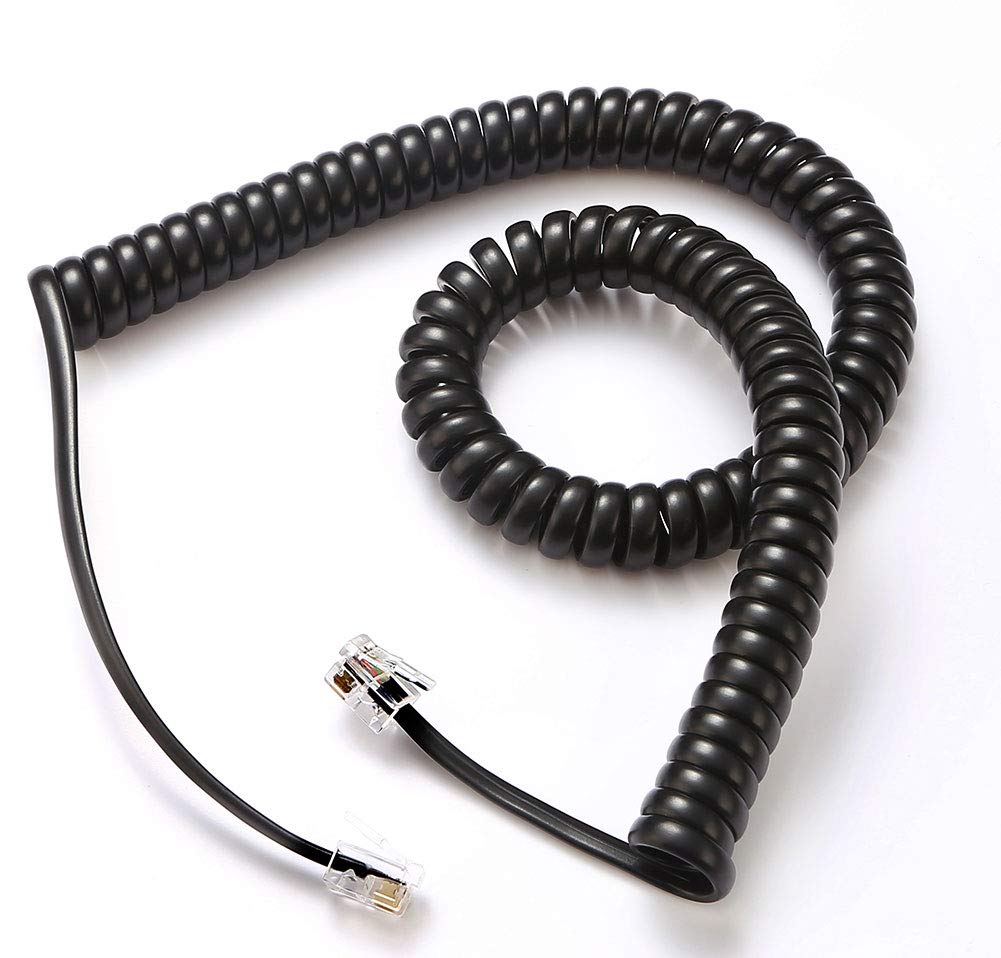
The handset comes unattached to the phone. You will need to connect the long, wound/stretchy cable to both the handset and the phone jack (designated by a port with a small handset symbol). One thing to make sure to consider is that the end of the cable with the long unwound section plugs into the phone, rather than the handset. Take a look at the picture below. The end with a long straight section plugs into the phone, while the end with the shorter straight section plugs into the handset.
¶ Headset
We cover this in our headset section of this documetation. Find that here:
¶ Forwarding the phones
Until we can port your number into our control, we need to forward your old phone system to ours so that you can continue receiving calls. This normally isn't a particularly difficult process. You simple have to ask your current providers to forward all calls to a temporary number that we will give you. The only potentially difficult part is getting your current phone provider on the phone.
Once this is complete, your new phones will start ringing for inbound calls. At this point, you will want to either unplug the old phones or set up the rest of the employees.