¶ Overview
Your phone has a touch screen. You can use this in conjunction with the physical buttons on your phone to take advantage of the different features.
¶ Phone Screen
This is what your main display will usually look like:
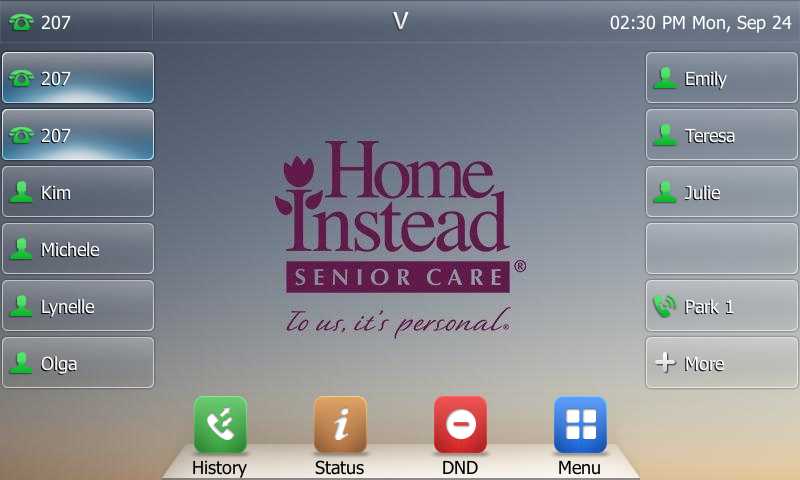
- The upper left shows that this phone is set up as extension 207.
- The two top left buttons that appear to be highlighted are the two phone lines, so you can be on two calls simultaneously and toggle between them.
- The other buttons that have other people’s names are links to other people in your office. Tapping on one of these will ring that person.
You can see your extension number in the top left corner of the screen. It usually falls between 200-220.
¶ Status Indicators
If you hit the more button, you will see more names and a few other buttons. Your phone will change to look more like this:
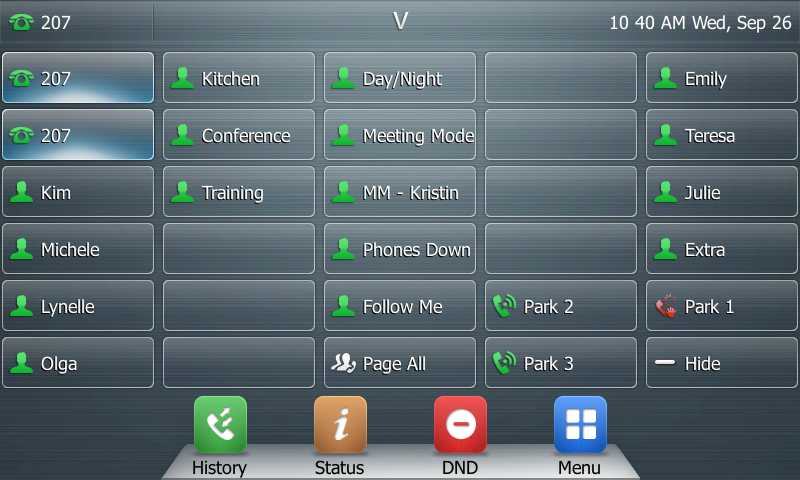
From this view, you can see all of the touchscreen buttons available to you. All of the buttons with the symbol of a person can also indicate the status of that function. If the person is red, then the function is enabled. If a coworker is on the phone, the icon will turn red by their name. If the system is in night mode, the night mode indicator will turn red.
¶ Physical Buttons
These are the physical buttons mapped to the button names:
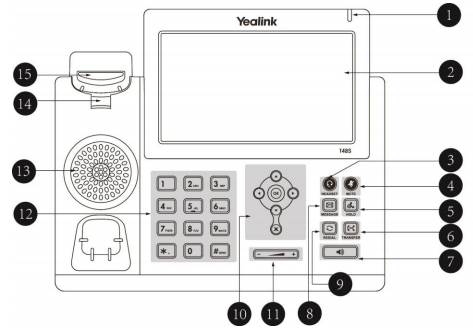
- LED call indicator
- 7" touchscreen
- Headset key
- Mute key
- Hold key
- Transfer key
- Speaker key
- Voice mail key
- Redialing key
- Navigation keys
- Volume key
- Alphanumerical key pad